
You're standing in a ballroom that looked perfectly acceptable during the site visit. The walls are clean, the stage is set, and the lighting plan works on paper. Then the doors open, daylight spills through the windows, guests sit at different angles, and the projected image that looked dramatic in the design deck becomes faint and difficult to read.
That's the conversation around projection mapping for events. The medium can transform a plain wall, stage, bar, ceiling, product, or architectural feature into part of the story, but the result depends on practical decisions made long before show day. Venue geometry, ambient light, audience distance, surface colour, rigging, and content design matter more than the novelty of the effect.
Why Projection Mapping Changes How a Room Feels
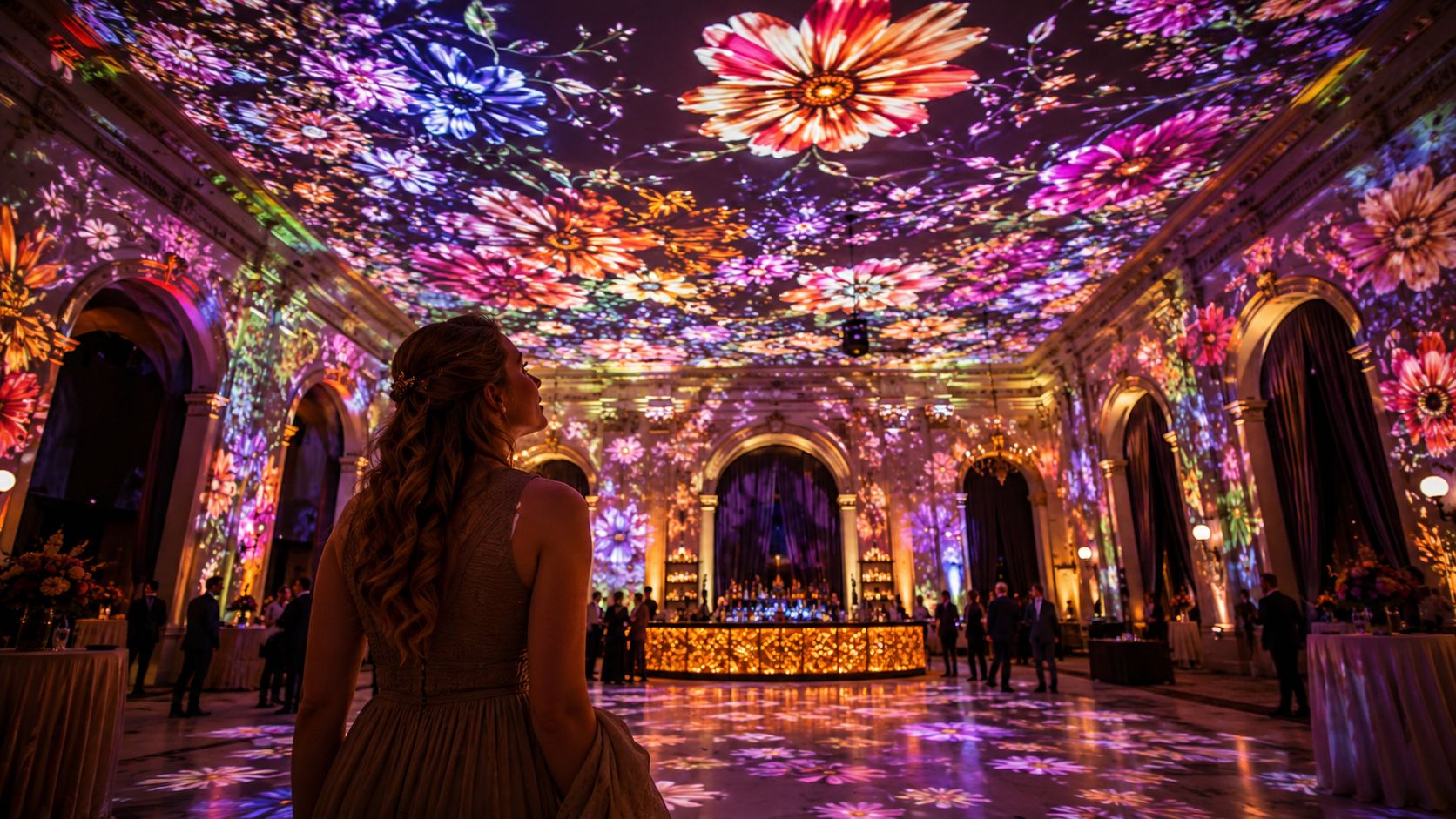
A guest enters a dimmed ballroom and sees a blank ceiling above the tables. Thirty seconds later, soft floral shapes begin moving across it. The bar appears to glow from within, the dance floor carries a subtle pattern, and the walls seem taller because the room now has motion and depth. Nothing structural has changed, yet the atmosphere feels completely different.
That sensory shift is the reason planners invest in projection mapping. It can make a compact reception space feel theatrical, turn a corporate stage into a branded environment, or give a charity gala a visual language that carries from the entrance to the dinner programme. The strongest designs don't add colour. They use the venue's architecture to support the host's message.
Scale is emotional, not just visual
A small tent can feel more expansive when imagery travels across its surfaces. A corporate stage can feel more substantial when content wraps around physical scenic pieces instead of sitting inside a rectangular screen. That perceived scale influences how guests remember the event and how confidently the host's message lands.
The effect works best when the visuals have a clear job. A wedding might use slow movement and restrained colour so the couple remains the focus. A product launch might use sharp transitions that reveal the shape of a new object. A gala might use architectural patterns and donor stories to create warmth without competing with conversation.
Too much motion creates the opposite result. If every surface carries a different animation, guests don't know where to look. The room feels busy rather than transformed, especially when content ignores sightlines or projects across surfaces that guests can't see from their seats.
Producer's rule: Start with the moment guests should feel, then choose the surface and visual treatment that support it.
Projection also needs to coexist with other event lighting. Uplights, pin spots, moving fixtures, and practical décor can either frame the mapped image or wash it out. A coordinated LED uplighting plan for events can help define the room while leaving the primary projection surfaces dark enough to read.
The technique has a long history rather than being a social media invention. Historical summaries trace important milestones to Josef Svoboda's 1958 presentation of Laterna Magika, Disney's Haunted Mansion in 1969, and formal immersive projection research in the late 1990s, including work associated with the University of North Carolina at Chapel Hill (historical overview of projection mapping). The craft has evolved for decades, and responsible event design begins by respecting its technical limits.
How Projection Mapping Actually Works
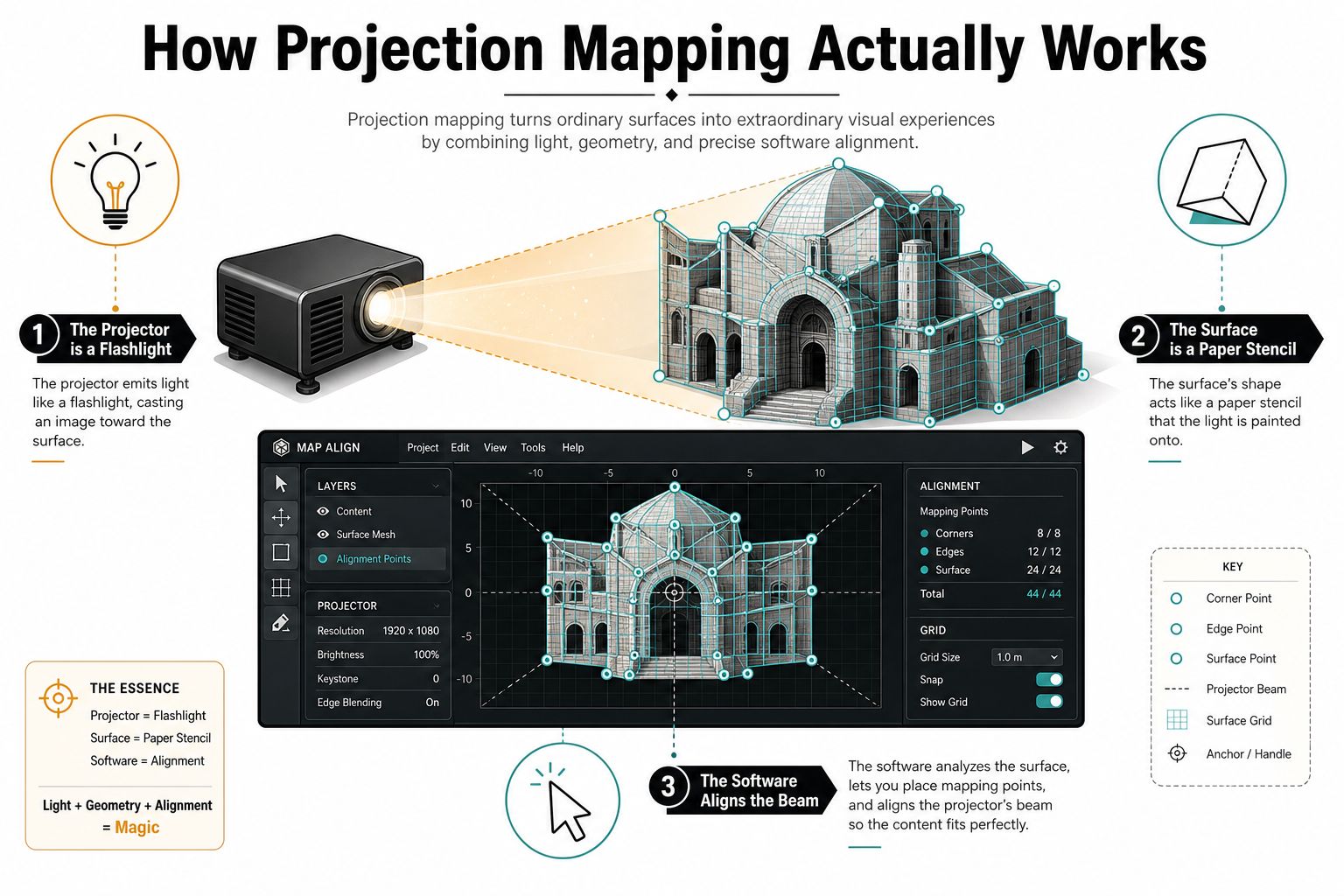
Think of a projector as a very precise flashlight. The surface is like a three-dimensional paper stencil, complete with folds, edges, and cutouts. Mapping software tells the beam where to land, stretching and reshaping the image so a digital design follows the physical object.
The three parts must agree
The projector supplies the light. Its lumen output affects how well the image survives ambient light, while the lens determines how far the projector must sit from the surface. Throw ratio is calculated from projector distance divided by image width. A short-throw lens around 0.5:1 can produce an image about 60 feet wide from a 30-foot distance, according to Arista ProAV's throw-ratio guidance. That makes lens selection a major placement decision, particularly in rooms where guests, truss, or scenery leave little space behind the projector.
The surface determines how the image reflects. A pale, matte surface usually gives content a cleaner foundation than a dark, glossy, or highly textured one. Texture isn't automatically a problem. Architectural detail can make a mapped image more convincing, but it also creates shadows, highlights, and small areas where content may disappear.
The software handles the alignment. Tools such as MadMapper and Resolume can warp content to fit arches, bars, scenic pieces, and facades. Larger productions may use systems such as disguise or Watchout for more complex playback, blending, and show control.
Why the venue decides the result
Ambient light is often the limiting factor. Conventional projection mapping assumes a dark environment because stray light reduces contrast. Practical guidance places large outdoor facade work in the 10,000 to 30,000-plus lumen range, while medium indoor ballrooms may need roughly 4,000 to 6,000 lumens and large indoor venues around 6,000 to 10,000 lumens, depending on the surface and lighting conditions (venue projection guidance).
Audience distance matters just as much. Fine detail can work for guests seated close to a stage, but it may vanish for people at the back of a ballroom. A designer should test the actual viewing angles, not only the front-row position.
For planners who want a hands-on way to think about surface shape, alignment, and visual sequencing, these mapping exercises for events offer useful creative practice. Your technical partner should also assess power, rigging, signal paths, and the venue's restrictions through a complete event technology solution.
Creative Ways It Shows Up at Real Events
At a wedding reception, the projection surface might be the wall behind the couple rather than the entire room. During the first dance, a monogram can appear among slow-moving floral motifs, then fade into a restrained pattern for dinner. The venue constraint is usually photography. Bright, fast content can compete with the couple and create harsh faces in photographs, so the creative team chooses softer movement and a palette that works with the room's low light.
A corporate product launch asks for a different kind of control. A physical stage piece can become the setting for a rotating digital model, with animation timed to the keynote reveal. The surface's shape drives the design. Edges, recesses, and raised elements can make the product feel dimensional, but only if the content team receives accurate measurements and the presenter has clear sightlines.
A charity gala may use mapping less as spectacle and more as atmosphere. Pillars can carry donor stories, while a ceiling treatment adds motion above the dining room. The venue constraint is attention. Guests need to read the message, talk to one another, and move through the space without feeling surrounded by competing screens.
Match the visual language to the event
A useful reference point is strong advertising design. Reviewing standout Black Friday ad designs can help a marketing team discuss hierarchy, contrast, product emphasis, and the difference between a memorable visual and a crowded one.
For private parties, mapping can also support the dance floor without turning the whole room into a video wall. A carefully placed pattern or animated motif can define the active area, much like a colourful dance floor effect does through lighting.
The best creative treatment begins with one question: what should guests notice first? If the answer is the couple, the product, the donor story, or the dance floor, every mapped surface should reinforce that priority.
The Gear That Makes the Magic Happen
A production quote becomes easier to understand when you separate the system into functional layers. The projector gets attention because guests see its output, but the less visible parts often determine whether the image holds alignment and timing throughout the programme.
Layer one is projection
Laser projectors are common for demanding event work because they can maintain brightness during long operating periods and accept high-resolution signals. A short-throw lens helps when the audience or scenery sits close to the projected surface. A long-throw lens is useful when the projector needs to be positioned farther away or hidden behind truss.
Brightness is only useful when the venue conditions support it. A powerful projector can't compensate for direct daylight landing on a pale wall, and adding more light may create glare or affect guests' comfort. The technical team should specify the lens and output after measuring the actual surface and throw distance.
Layer two is the canvas
The surface might be a painted flat, foam scenic façade, architectural feature, bar, product, or decorative installation. The choice should account for reflectance, texture, seams, and how much of the surface the audience can see.
Layer three handles playback and mapping
Mapping software warps the content, blends multiple outputs, and keeps the image aligned with the physical build. Resolume and MadMapper can suit smaller or focused productions, while Watchout and disguise may fit larger systems with more complex media-server requirements.
Layer four keeps the show stable
Rigging, signal distribution, power, networking, and timecode sync rarely appear in the hero image, but they decide whether a transition lands cleanly. A show can have excellent animation and still look sloppy if one output loses sync or if a cable path forces an unsafe workaround.
| Layer | Common Choices | Constraint It Solves |
|---|---|---|
| Projection | Laser projector, short-throw or long-throw lens | Brightness, distance, and placement |
| Surface | Scenic flats, façades, bars, products, architectural features | Shape, reflectance, and texture |
| Playback and mapping | MadMapper, Resolume, Watchout, disguise | Warping, blending, playback, and control |
| Infrastructure | Rigging, signal distribution, power, networking, timecode | Stability, safety, and synchronisation |
A planner comparing quotes should ask whether each layer is included or treated as an extra. A vendor offering broad audio-visual equipment for events should be able to explain the signal path, backup plan, calibration process, and venue approvals in plain language.
From First Idea to Show Day Workflow
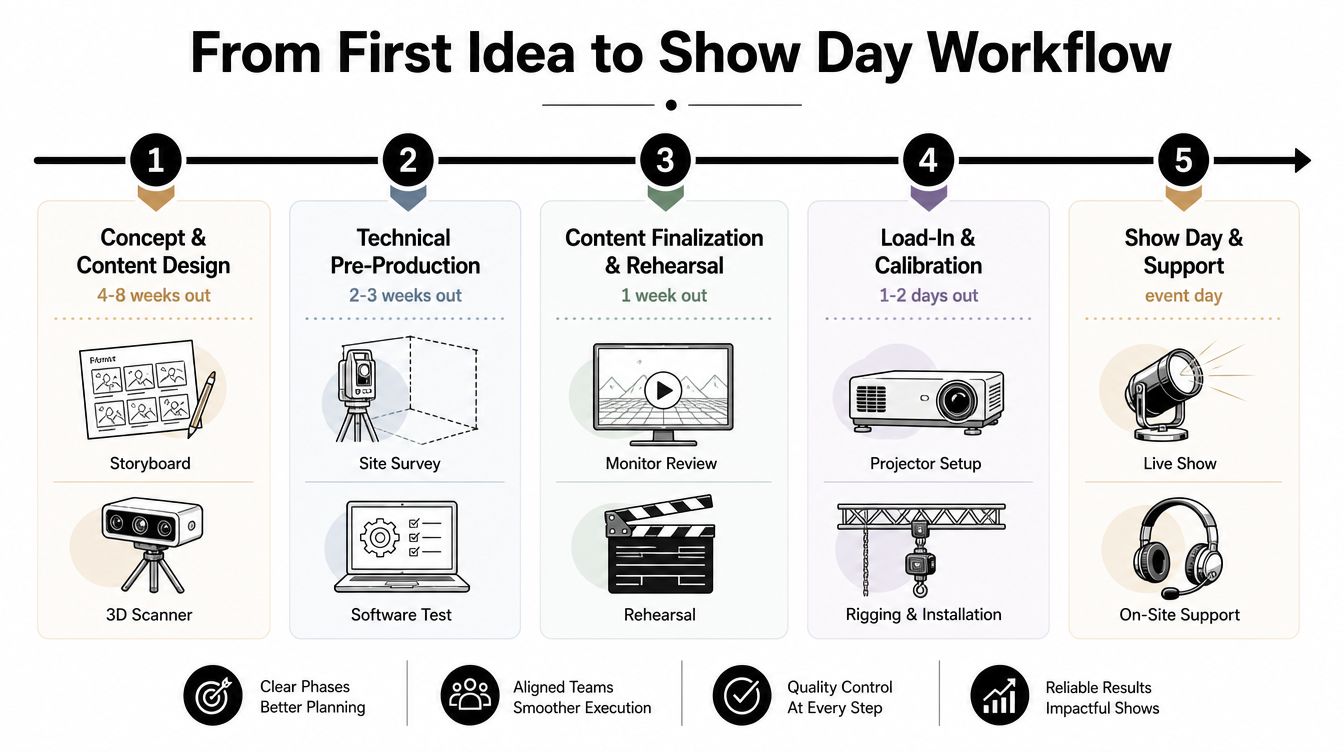
Projection mapping needs a production timeline because content and hardware depend on the same physical information. A creative team can't finalise accurate animation before it understands the surface, and a technical team can't calibrate reliably if the scenic build changes after content lock.
Start with the venue and the story
During the first phase, the designer and producer define the audience experience, target surfaces, content style, and show cues. A site survey may include photographs, measurements, LiDAR, or photogrammetry so the team can build a digital representation of the venue.
The most useful early checkpoint is a shared concept that everyone can test. The client should know which moments are essential, which content is decorative, and what happens if a surface becomes unavailable.
Test before shipping equipment
Previsualisation lets the team test the mapping on a digital model before load-in. Animators can check whether a logo sits on the intended architectural feature, whether a transition supports the presenter, and whether the content remains legible from the back of the room.
A practical workflow includes these checkpoints:
- Concept approval: Confirm the story, surfaces, audience position, and visual hierarchy.
- Technical survey: Record measurements, throw locations, ambient light conditions, rigging points, power, and signal routes.
- Content lock: Approve the final creative direction and establish a revision deadline.
- Hardware load-in: Verify projector positions, lenses, scenic surfaces, cables, playback systems, and safety approvals.
- Calibration and go-no-go: Warp and blend the outputs on site, then test cues, backup media, and contingency procedures.
Rehearsal exposes the uncomfortable problems
A full technical rehearsal is where daylight, practical fixtures, rigging clashes, presenter positions, and timing errors become visible. The team should test the show from multiple audience locations, not only from the control position.
Show day needs a concise call sheet covering power, network, playback, content versions, operator responsibilities, and the response if a projector or playback device fails. A backup file doesn't replace a backup plan. The crew also needs to know which visual elements can be removed while keeping the event functional.
Projection Mapping Versus LED Walls and Gobos
The right display technology depends on the room, not on which effect looks most impressive in a proposal. Projection mapping is strongest when the image needs to follow a physical object or architectural surface and the lighting can be controlled. LED walls are more dependable when daylight or bright house lighting can't be reduced, while gobos remain practical for a focused static monogram or logo.
| Option | Typical Cost Bracket | Setup Time | Best Fit |
|---|---|---|---|
| Gobos | Often the lowest-cost option for a focused static design | Usually quick | Monograms, logos, and simple floor or wall branding |
| Projection mapping | Entry-level work is cited at $2,000 to $5,000, while custom builds are cited at $5,000 to $15,000-plus (event technology comparison) | Requires survey, rigging, alignment, and testing | Product launches, brand activations, immersive environments, and shaped surfaces |
| LED walls | Typically a larger equipment and rigging commitment than a simple projection treatment | Requires structural planning and assembly | Bright rooms, close viewing, high-fidelity playback, and modular screen layouts |
Use the venue as the decision threshold
Choose gobos when you need one static design and want minimal setup. A gobo can't animate or wrap around a curved build, but it can deliver a clean monogram without asking the room to become a dark theatre. For weddings and private parties, a dedicated gobo projector rental may be the more sensible choice.
Choose projection mapping when the surface itself is part of the story. It earns its place for a product reveal on a shaped object, a brand activation that needs environmental movement, or an immersive event where controlled light allows the image to read.
Choose LED when the room stays bright, guests sit close, or the content must remain crisp from every angle. LED walls carry their own light, but they bring added weight, structure, power, and visual presence. They also behave like screens, which may be exactly what you want, but may work against a design built around the venue's architecture.
The market's scale reflects that event demand has moved beyond niche experimentation. One estimate places the projection mapping market at USD 3,481.4 million in 2024, with a projection of USD 15,852.9 million by 2032, while another estimates USD 5.00 billion in 2025 and projects USD 26.17 billion by 2035 (market analysis). Those projections don't decide your event, but they do show that planners can now find a broad production ecosystem around the technique.
Smart Planning Tips and Final Checklist
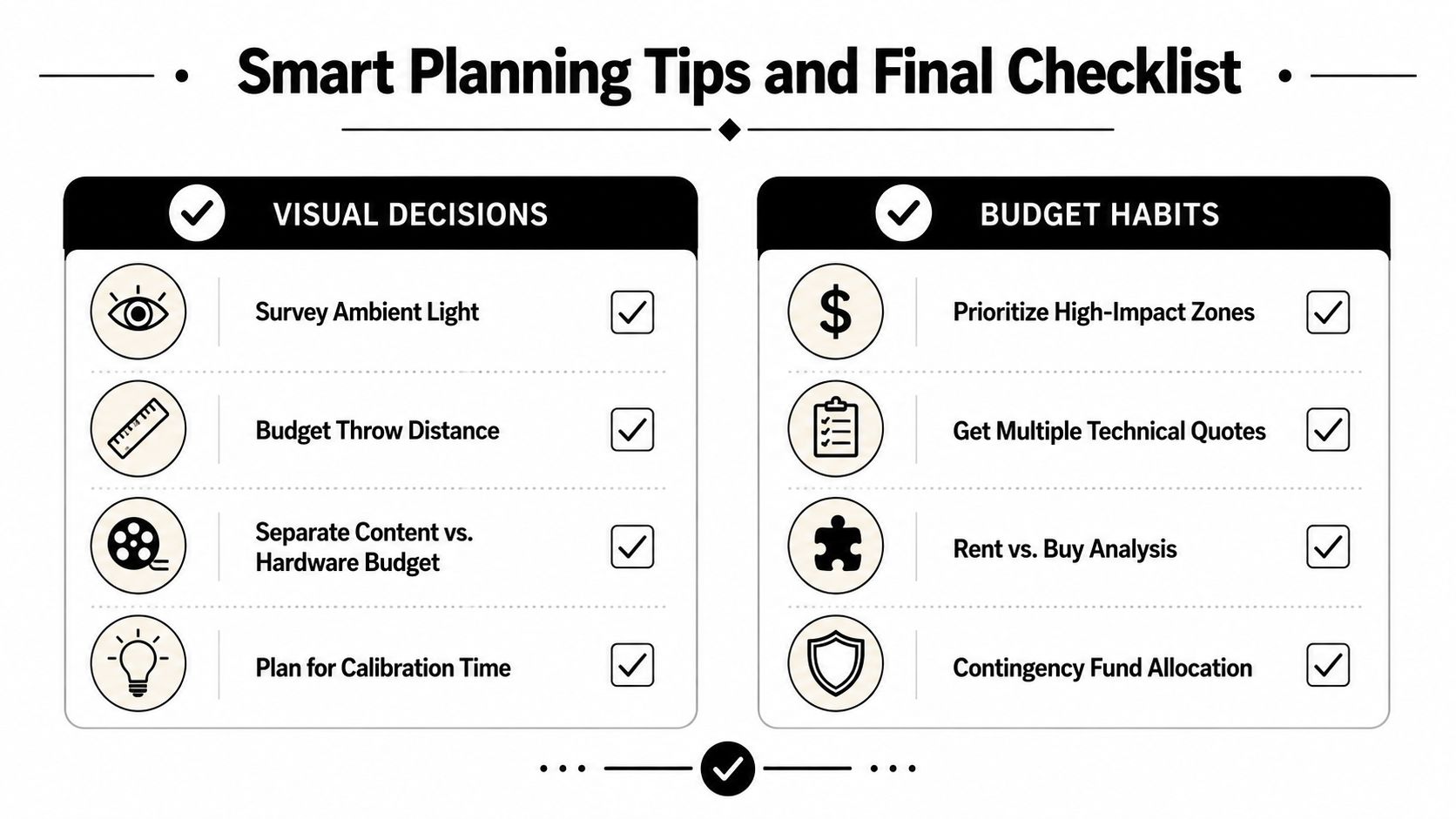
A strong projection plan starts with practical evidence. Photograph the surfaces, measure the throw, identify the brightest parts of the day, and decide where the audience will stand or sit. Don't approve a visual concept based only on a rendered image that hides windows, reflective finishes, and obstructed sightlines.
Budget content separately from hardware. A projector rental may be straightforward, while custom animation, 3D modelling, revisions, playback programming, and on-site calibration require different labour. Ask vendors to identify each part of the quote so you can reduce scope intelligently if the budget changes.
Hand your vendor a useful brief
Include these details before anyone designs content:
- Surface documentation: Send clear photographs, measurements, elevations, colour information, and notes about texture or gloss.
- Audience positions: Mark the stage, tables, entrances, queue areas, and the farthest meaningful viewing point.
- Light conditions: Record daylight, house lighting, practical fixtures, and any lighting that must remain on during the show.
- Throw and rigging information: Identify possible projector locations, lens requirements, ceiling heights, approved rigging points, and cable routes.
- Content specifications: Confirm playback resolution, file format, aspect ratio, frame rate, audio or timecode requirements, and naming conventions.
- Operational safeguards: Request backup media, spare signal paths where appropriate, power details, operator coverage, and a response plan for equipment failure.
- Approval deadlines: Set a firm content revision and lock date so late creative changes don't undermine calibration.
Final check: If the image only works from the designer's preferred camera angle, it isn't ready for guests.
Reserve rehearsal time for alignment and audience testing, not just for adding effects. Prioritise the surfaces guests will notice most, and keep secondary treatments quieter so the room retains hierarchy.
The most effective mapping disappears as a technical trick. Guests don't need to think about lenses, warping, or media servers. They should remember that the room felt made for the occasion.
Planning lighting or visual production for an event in Fort Atkinson, Southern Wisconsin, or Northern Illinois? Explore 1021 Events lighting and event services across Southern Wisconsin and Northern Illinois, then check availability.